Google Maps Scraper
Turn any Google Maps search into a spreadsheet of local businesses, with phones, emails, ratings and addresses. No code.
- $10 free balance
- No card required
- CSV or JSON
- and socials, optional
- Emails
- places per search
- 1,000
- fields on every row
- 12
- needed to start
- No card
See a search run, start to finish
One category, one city, a file at the end.
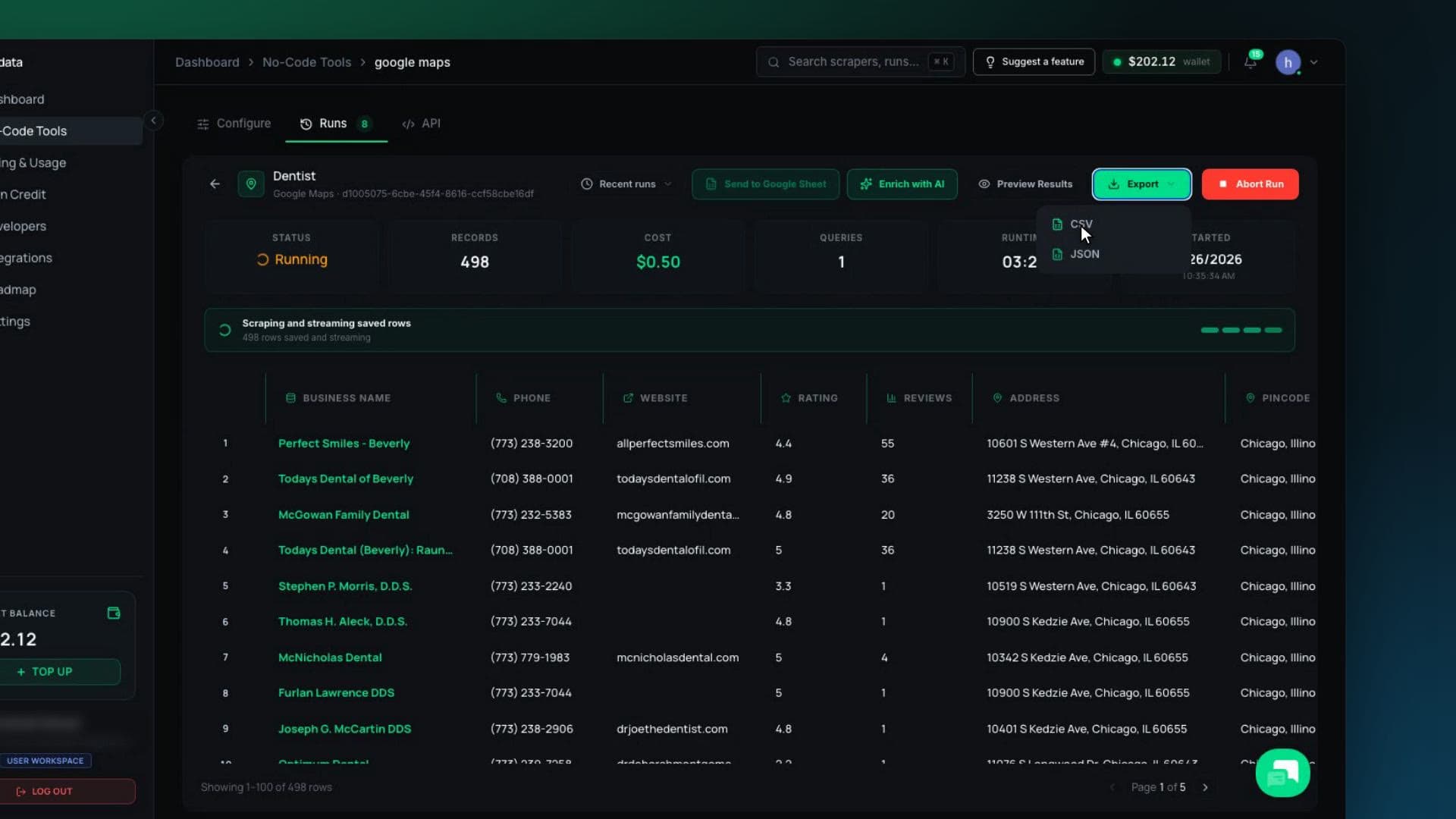
One row per business
A search for businesses in Austin, TX returns rows like these, with the same columns every time.
Google Maps lists almost every shop, clinic and trade business, but only lets you read them one at a time. This tool runs the search for you and hands back every matching listing.
Search several categories and locations in one run. "Plumber" and "electrician" across Austin, Dallas and Houston is six searches, all in one file. Switch on email lookup and Pulldata also checks each business website for a contact address.
| title | category | phone | rating |
|---|---|---|---|
| Bright S••• Dental | Dentist | +1 (512) 555-01•• | 4.8 |
| Northside P••• Plumbing | Plumber | +1 (512) 555-02•• | 4.6 |
| Lamar C••• Coffee | Coffee shop | +1 (512) 555-03•• | 4.7 |
| Eastside A••• Auto | Auto repair | +1 (512) 555-04•• | 4.5 |
| Hill Country Y••• Studio | Yoga studio | +1 (512) 555-05•• | 4.9 |
Sample rows, masked
Three steps, no code
- 1

Add your search
Type a business category, like "dentist", and the cities or ZIP codes to cover. Ask for up to 1,000 places per search.
- 2

Run it
Pulldata searches every category and location pair and collects each listing. Close the tab if you like; the run keeps going.
- 3

Download the file
Preview the rows, then export CSV or JSON. Past runs stay in your history to download again at no charge.
Narrow the search before it runs
Every filter in the app, set before you spend a cent. Combine them freely in one run.
What Pulldata handles for you
The parts of scraping Google Maps that usually break. None of them are your problem here.
- Rotating residential proxies on every request
- CAPTCHAs solved during the run
- Blocked requests retried through a fresh proxy
- Cities and states split into a grid of smaller searches, past one search's cap
- Duplicates removed by Google place ID
- Parallel workers that scale with the size of the job
- Search by ZIP or postal code
- Email and social profiles found on each business website
- Big runs save checkpoints and resume
- Failed rows cost nothing
Who uses it
Anyone who needs a list of local businesses to sell to, study or keep track of.
- Marketing agencies
- List every clinic in a niche, then pitch the ones with low ratings and a live website.
- Cold email and calling
- Pull a territory with emails on and hand SDRs a list they can work today.
- Competitor research
- See who competes nearby and how they rate.
- Local SEO audits
- Compare a client with nearby listings, tracked by place ID.
- Site selection
- Count businesses of a type per ZIP code before you pick a spot.
- Data teams
- Check an old file against today's map to catch closed or moved businesses.
Every field in the export
The same 12 columns in every CSV and JSON file. A field stays empty when the listing lacks it.
title- Business name
category- Primary Google category
phone- Listed phone number
primary_email- Email from the business website
website- Website on the listing
address- Full street address
city- City
state- State or region
pincode- ZIP or postal code
rating- Star rating, 1.0 to 5.0
reviews_count- Number of Google reviews
place_id- Google Place ID
Prefer code? Same search, one request
Send categories and locations, get rows back as JSON. Same fields and prices as the app.
Request
curl -X POST https://pdb.pulldata.io/v1/google-maps/search/results \
  -H "Authorization: Bearer pd_live_YOUR_API_KEY" \
  -H "Content-Type: application/json" \
  -d '{
    "categories": ["plumbers", "electricians"],
    "locations": ["Austin, TX", "Dallas, TX"],
    "max_leads_per_query": 50,
    "scrape_emails": true
  }'
Response (excerpt)
{
  "success": true,
  "total_leads": 50,
  "results": [
    {
      "title": "Austin Premier Dental & Orthodontics",
      "category": "Dentist",
      "phone": "+1 (512) 555-0188",
      "primary_email": "info@austinpremierdental.com",
      "city": "Austin",
      "rating": 4.9,
      "reviews_count": 312,
      "place_id": "ChIJ7w5qN3zKRIYRL..."
    }
  ]
}
Send results where you work
Why teams pick Pulldata for Maps data
- 01
You pay per row, not per month
Rows cost $1 per 1,000 and failed rows are free. There is no seat fee to keep paying in the months you do not run a search.
- 02
Nothing to maintain
Proxies, CAPTCHAs, retries and Google's layout changes are handled on our side. When Google changes something, you keep getting the same columns.
- 03
Whole cities, not one screen
Big areas are split into a grid of searches and merged by place ID, so you get the long tail of businesses a single search hides.
- 04
Same tool, with or without code
Run it from the app, push results to Google Sheets, or call the REST API and MCP server with the same inputs and prices.
What a run costs
$1 per 1,000 places. Email lookup adds $1 per 1,000. You pay only for rows that come back. Live pricing.
Rates from pulldata.io/pricing, checked 31 Oct 2026. Paid plans apply their discounts on top.
Pulldata vs other ways to get Maps data
Entry prices as each provider publishes them. Volume discounts and plans change the numbers.
Outscraper
From $1 per 1,000 records
First 500 places free, then $3 per 1,000 until 100,000; $1 after that. Source
Apify
From $1.50 per 1,000 places
Google Maps Scraper actor, pay per event; cheaper on paid plans. Source
Google Places API (official)
From $32 per 1,000 requests
Text Search Pro, 5,000 free events a month. Each request returns a page of places, not one. Source
| Provider | Starting price | Notes |
|---|---|---|
| Pulldata | From $1 per 1,000 rows | $10 free balance. Email lookup adds $1 per 1,000. Source |
| Outscraper | From $1 per 1,000 records | First 500 places free, then $3 per 1,000 until 100,000; $1 after that. Source |
| Apify | From $1.50 per 1,000 places | Google Maps Scraper actor, pay per event; cheaper on paid plans. Source |
| Google Places API (official) | From $32 per 1,000 requests | Text Search Pro, 5,000 free events a month. Each request returns a page of places, not one. Source |
Prices from each provider's public pricing page, checked 31 Oct 2026.
Questions, answered
Is it legal to scrape Google Maps?
How many places can one run return?
Do I need my own proxies?
What happens if Google blocks a request?
What formats can I export?
How fresh is the data?
What is the place_id field for?
How does the email lookup work?
Can I use this through an API?
How do I start for free?
Run your first Google Maps search
New accounts get a $10 balance. No card.